
Receipt scanning from camera, Photos, screenshots or PDF
Paper at the till, a photo from last week, a screenshot of an online order or an emailed PDF: every route ends in the same structured record.


- Multi-page receipts
- Batch imports
- Offline queue
Capture
Scan the way the receipt arrives
Paper, photo, PDF or a share from another app: every route ends in the same structured record.
Camera
The document scanner finds the edges and straightens the page. Long receipt? Scan several pages into one receipt.
Photos
Pick one photo or a batch from your library. Each becomes its own receipt.
PDF
Import emailed receipts and invoices as PDF files.
Share sheet
Send an image or PDF to ReceiptGenie from Mail, Files, Messages or any other app.
No signal? Keep scanning. Uploads wait in a queue and the read finishes once you are back online.
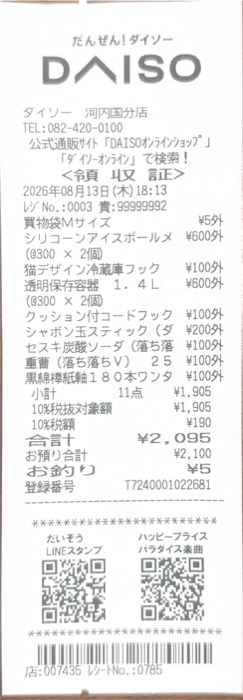
Extract
One photo becomes a structured receipt
ReceiptGenie does not stop at the total. Each scan is saved as a record you can edit, search, tag and export.
- Merchant
- Cleaned-up store name, not the till header.
- Date and time
- From the receipt, converted to the right timezone.
- Currency and total
- Detected from the receipt, best for international travel.
- Tax, tips and discounts
- Kept as separate lines.
- Line items
- Quantity, unit price and amount per item.
- Tags
- Suggested by AI based on your own categories.
Questions before you scan
Can it scan long or multi-page receipts?
Yes. The camera scanner lets you scan several pages into one receipt, so long grocery receipts and multi-page invoices stay together as one record.
Can I scan receipts from photos or screenshots?
Yes. Pick one photo or a batch from your library, or share a screenshot or PDF into ReceiptGenie from any app. Each becomes its own receipt.
Does it work offline?
You can scan and import offline. Extraction runs on ReceiptGenie servers, so the structured record appears once the phone is back online.
Which receipts and languages does it read?
Thermal receipts, printed invoices, photos of receipts and PDF files, in many languages and scripts. Receipt content can be translated into your language on demand.
Scan your first receipt
Download ReceiptGenie and try the camera, Photos and PDF routes with 25 free Smart Scans.
Free to download on the App Store and Google Play.