
Itemized receipt scanning with editable line items
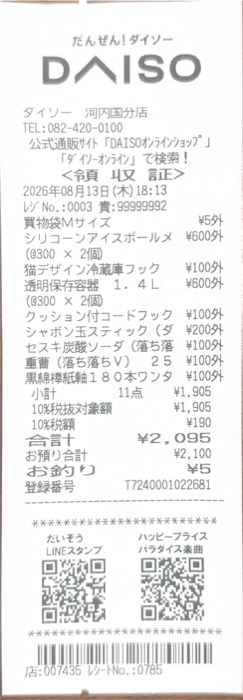
Each scan becomes a record with merchant, date, currency, total, tax, discounts and every line item. Search by item, tag single items and export the table.


- Quantity, unit price, amount
- Tax and discounts as lines
- Every field editable
Extract
One photo becomes a structured receipt
ReceiptGenie does not stop at the total. Each scan is saved as a record you can edit, search, tag and export.
- Merchant
- Cleaned-up store name, not the till header.
- Date and time
- From the receipt, converted to the right timezone.
- Currency and total
- Detected from the receipt, best for international travel.
- Tax, tips and discounts
- Kept as separate lines.
- Line items
- Quantity, unit price and amount per item.
- Tags
- Suggested by AI based on your own categories.
More features
Everything after the scan
Search, statistics and reports all work from the same receipt records, on iPhone and Android.
ink
StaplesHP 64 Black ink · Aug 12$24.99
Search by item
Type a word that is printed on the receipt, such as "ink", and find it by item, not just by store.
Receipt keeper and organizerSpending by tag: Groceries 40%, Dining 22%, Household 11%, Other 27% $860.00- Groceries$342.60
- Dining$186.20
- Household$98.45
Statistics
Spend by tag, merchant and currency over any date range, with a drill-down to the receipts.
Business expense tracker- CSV
- XLSX
Reports and exports
Group receipts into a report and export it as PDF, CSV or XLSX, original images included.
Expense report app
Questions before you scan
How accurate is the AI receipt scanner?
ReceiptGenie uses AI extraction rather than a fixed template, so it handles long grocery receipts, restaurant bills and invoices. Every field stays editable if something is off.
What if a line is read wrong?
Open the receipt and edit the line: description, quantity, unit price or amount. The record updates everywhere it is used, including statistics and reports.
Can I tag a single line item?
Yes. Tags work on whole receipts and on single line items, so one receipt can hold personal and business purchases and still total correctly by tag.
Can I export receipts into Excel?
Yes. Export a report as CSV or XLSX. The original receipt images come along with the spreadsheet, and PDF reports embed them.
Export guideSee your receipts itemized
Download ReceiptGenie and scan a long receipt; each line comes back as its own editable row.
Free to download on the App Store and Google Play.